Thoughts of faith and development.

Tag: learning

  • Web Components vs. React

    This post comes at a time when I’m on the hunt for a new opportunity. While I do, I’m practicing my skills, exploring new ideas, and having some fun. If you have an opportunity for me, you can find my CV here.

    Recently, a friend of mine Dan Q shared an interesting post about using a Web Component instead of React to simplify a particular problem.

    He shared this post:
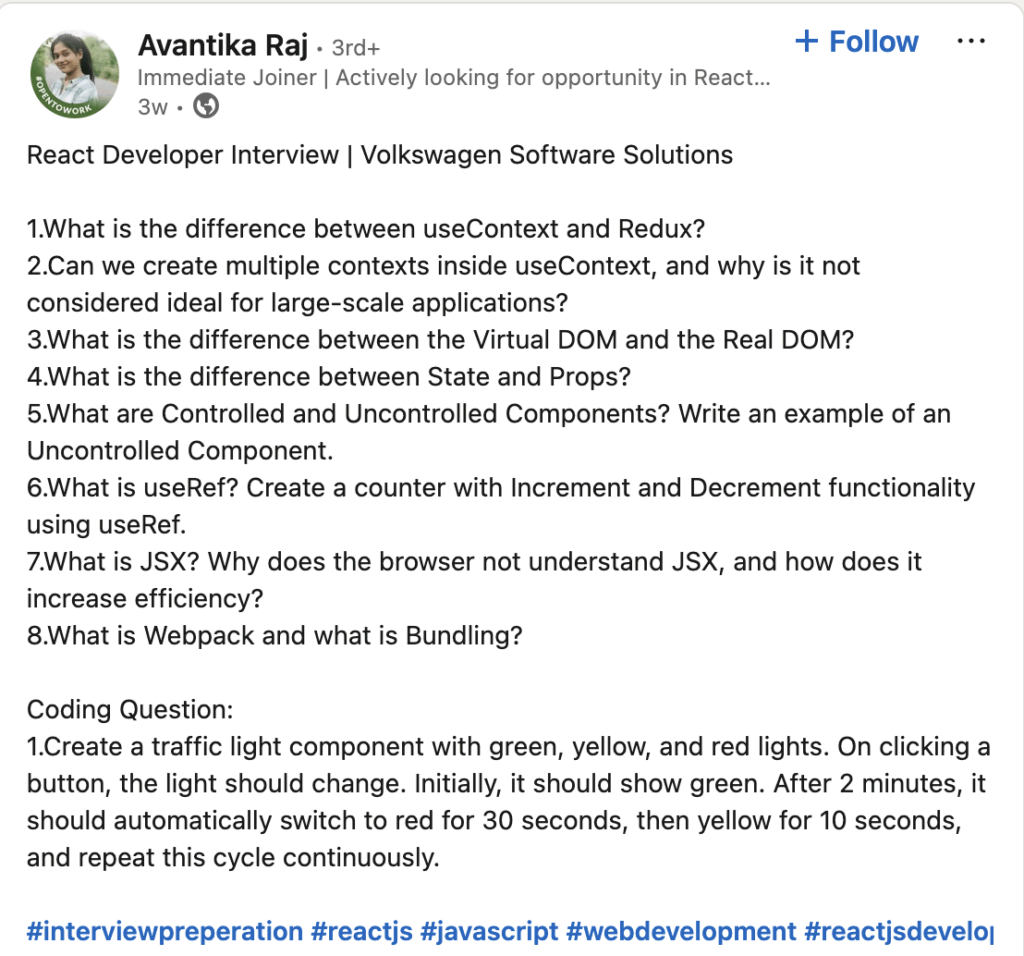
    It’s always nice to see folks sharing code test questions. When you’re trying to practice or are yourself in the job market, it’s a great way place to get ideas.

    In Dan’s words:

    What I found myself thinking was… man, this is chunky. React is… not the right tool for this job.

    I tend to find myself agreeing with this, but not necessarily having a better solution. Dan suggested that a Web Component with vanilla JavaScript was the way to go here. Now, I’ve heard Dan share his love of Web Components multiple times in the past while we were colleagues. I haven’t had the pleasure of playing around with them before. Why not start today?

    I built an ugly version in React just to show I could. It was much of what I’m used to in React, component, JSX, hooks, and so on. But getting an environment together with a build step, just for something like this did feel overkill.

    So I went ahead and built my very first Web Component:
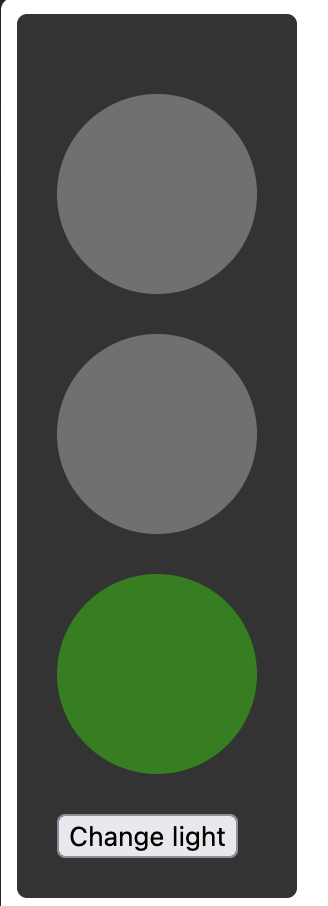
    Yep, that’s a static image of a traffic light taken from my web component project. Pretty cool, huh?

    So how does this work? Essentially you define a class with the functionality of your component using the Web Component API. You then register the component and can use it in your HTML just like any other standard HTML element:

    <body>
        <traffic-robot></traffic-robot>
    </body>
    

    Aside: fun fact about terminology here. In South Africa, where I live, a traffic light is called a “robot”, hence the odd naming of my component!

    I also decided to utilise the ShadowDOM to register styles and markup that are associated with the component in a way that is totally isolated from the rest of the document. That way my component would behave and look as expected no matter where it is used. No worry that styles from somewhere else are going to alter things!

    Either way, this has been really fun and a good bit of practice to keep my brain sharp. Feel free to take a look at the code in the repository. I warn you, it’s a bit messy with it being a quick and dirty test project!

  • Experiments in Block Art

    Experiments in Block Art

    Playing around with methods for creating art using WordPress blocks only. These experiments all work best on desktop, although seeing how they respond on mobile is quite interesting.

    Browse More
  • TIL: Passing parameters to callback functions

    Today I tried to move an Event Listener callback function to it’s own module. It seemed simple enough. Take the following code example:

    app.js

    element.addEventlistener("submit", (event) => {
      event.preventDefault();
    });
    

    Now, my callback was a little more complex so it made sense to move to a module. The question then became why it didn’t work when I tried the following:

    app.js

    element.addEventListener("submit", eventHandler(event));
    

    eventHandler.js

    function eventHandler(event) {
      event.preventDefault();
    }
    

    I would get an error from app.js saying that event is not defined. After a little research I discovered on the MDN guide for addEventListener that you need to pass parameters using an anonymous function. My eventHandler() was fine – the issue was in the way I passed the parameter to the function in the callback. To fix it this was the solution:

    app.js

    // Arrow function syntax
    element.addEventListener("submit", (event) => {
      eventHandler(event);
    });
    
    // Full function syntax
    element.addEventListener("submit", function(event) {
      eventHandler(event);
    });
    

    Edit: turns out there is an even simpler approach when you’re only sending a single parameter – just don’t add the parameter to the callback function at all. This is also valid and you will still be able to access the parameter in the callback:

    element.addEventListener("submit", eventHandler);
    
  • The second is even harder

    So, I started this blog with the intention of putting thoughts and experiences of learning somewhere. The thing that I quickly realise in my learning journey is the challenge of figuring out what I don’t know.

    I have “dabbled” in development (PHP, JavaScript and a few others) over many years and learned a lot along the but much of it was never coherent knowledge. So then if I can’t figure out what I don’t know, how can I know if I’m good enough yet?

    There are only so many times you can take a beginners course or even struggle through an intermediate course while thinking “I know this stuff, but I’m not confident so I’m clearly not ready” before I lost my way a little. I’ve started and restarted courses many times but each time I come back to it I feel lost again. Then the imposter syndrome sets in and I mentally put myself in the “still learning, not ready” category.

    I have learned task runners, local development environments, loops, site migrations, database manipulations and so much else over the years that I often question if I really know as little as I think but then actually try to develop something, get overwhelmed and give up to pursue the next project that hasn’t lost me yet!

    What is different this time? I’m not alone and I have a plan. I have a mentor, friends reviewing my code, I’m planning my project out before I even begin to write any code and so I have a framework to follow. The best part? It’s working!

    I haven’t felt this confident in my learning journey in a long time. So I encourage you, if you’re struggling to progress in your learning – get a plan, collaborate on your code, find a mentor, find a friend. Get your code on Github or some other version control system and get them to comment on your code as issues or pull requests. You will feel far better and have somewhere to get your internal criticism out into the open to allow others to encourage you instead.

    Feel free to check out the current learning project I’m working on!

  • The first post is the hardest

    Why do this blog? To make myself write thoughts and process what I learn as I grow my ability as a developer. I plan to write, even if it’s small and even if someone else wrote a better post about what I learned.

    Why public? I work for Automattic – a fundamentally distributed organisation who also make incredible Open Source software. We code in the open – you can find much of our code, issues and discussions publically so, why not learn to embrace that? Maybe someone will also learn something valuable along the way. Even if they don’t, I’ll still become a better blogger!

    Edit: how could I forget – we’re pretty heavily about WordPress so why wouldn’t I blog with it?

    I have no idea what I’ll post just yet so let’s enjoy the ride together. What I do know is that I plan to write a post at least once every month to start.

    Also…this post was written using the “Introduce yourself (Example post)” posts that are on WordPress sites by default. Whoever came up with that – you are amazing.